> ## Documentation Index
> Fetch the complete documentation index at: https://phidatainc.mintlify.site/llms.txt
> Use this file to discover all available pages before exploring further.
# What is AgentOS?
> Run agents, teams, and workflows using FastAPI.
AgentOS is the FastAPI for agents. It serves agents as an API, an MCP server, and through chat interfaces like Slack, Telegram, and WhatsApp. Here's the simplest possible example:
```python lines workbench.py theme={null}
from agno.agent import Agent
from agno.db.sqlite import SqliteDb
from agno.os import AgentOS
from agno.tools.workspace import Workspace
workbench = Agent(
name="Workbench",
model="openai:gpt-5.5",
db=SqliteDb(db_file="workbench.db"), # session storage
tools=[Workspace(".")], # read/write in this directory
add_history_to_context=True, # add past 3 runs to context
)
# Serve via AgentOS, get streaming, session isolation, API endpoints
agent_os = AgentOS(
agents=[workbench],
tracing=True,
scheduler=True,
mcp_server=True,
db=SqliteDb(db_file="workbench.db"),
)
app = agent_os.get_app()
if __name__ == "__main__":
agent_os.serve(app="workbench:app", reload=True)
```
AgentOS covers the valley of death between an agent definition and a live service. It gives agents a durable runtime, multi-user RBAC, background execution, checkpointing, session management, tracing, evals, guardrails, and more.
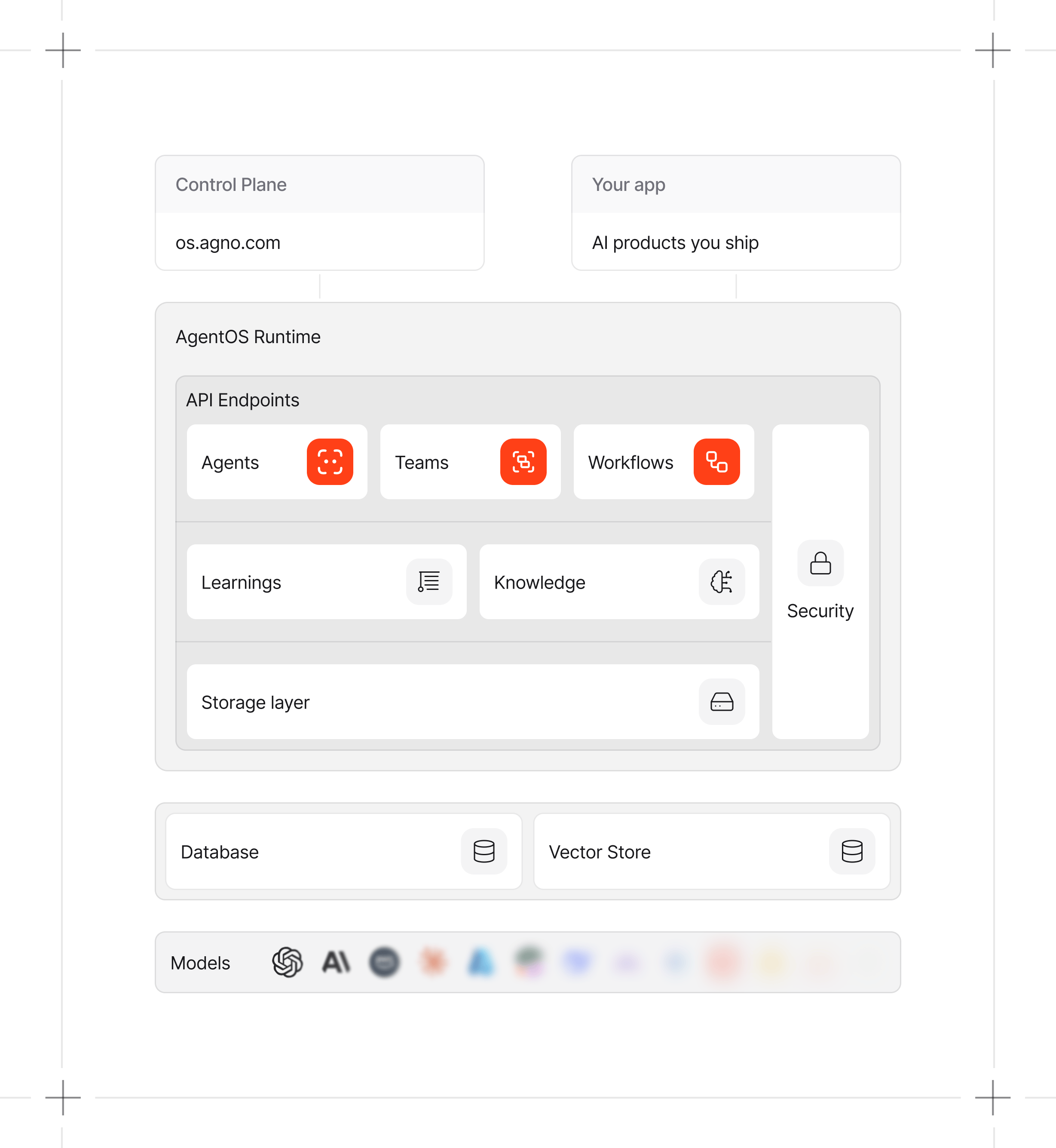
Build agents, teams, and workflows with the Agno SDK. Run them with AgentOS. Manage and monitor them using the Control Plane.
## What AgentOS gives you
| Need | AgentOS capability |
| ----------------- | ------------------------------------------------------------------------------------------------------------------------------------------- |
| Product API | REST endpoints for running agents and managing sessions, memory, knowledge, traces, evaluations, schedules, and approvals |
| Interfaces | Built-in REST, SSE, and workflow WebSocket endpoints, plus configurable MCP, A2A, AG-UI, Slack, Telegram, and WhatsApp interfaces |
| Persistent state | Sessions, memory, knowledge, and runtime data stored in databases you configure |
| Long-running work | Background execution, buffered stream reconnection after client disconnects, human-in-the-loop, run cancellation, and persisted run history |
| Operations | Metrics, evaluations, opt-in tracing, approvals, schedules, and component versions |
| Access control | JWT authorization with RBAC, a shared security key, and scoped service accounts |
| Framework support | Native Agno components plus adapters for the Claude Agent SDK, LangGraph, DSPy, and Antigravity |
## Build, run, and manage
| Layer | Role |
| ----------------- | -------------------------------------------------------------------------------------------- |
| **SDK** | Build agents, teams, and workflows with memory, knowledge, guardrails, and 100+ integrations |
| **AgentOS** | Run your agent platform in production with a stateless, secure FastAPI backend |
| **Control Plane** | Manage and monitor AgentOS runtimes from one web interface |
The runtime exposes the APIs that power the Control Plane and your products.
 ## Your runtime, your data
AgentOS runs in your infrastructure and writes runtime state to databases you configure. The Control Plane connects directly from your browser to the runtime endpoint.
Model providers, tools, telemetry, and other external services follow the configuration of your application. See [Security & Auth](/agent-os/security/overview) for authentication modes, service accounts, and endpoint permissions.
## Next steps
Serve an agent through FastAPI and inspect its local API.
Start from a template with deployment, Postgres, and evals already wired in.
Manage and monitor a local or deployed runtime.
Run components and manage runtime data over REST.
Use streaming, background execution, and buffered reconnection.
Configure authentication, permissions, and user isolation.
## Your runtime, your data
AgentOS runs in your infrastructure and writes runtime state to databases you configure. The Control Plane connects directly from your browser to the runtime endpoint.
Model providers, tools, telemetry, and other external services follow the configuration of your application. See [Security & Auth](/agent-os/security/overview) for authentication modes, service accounts, and endpoint permissions.
## Next steps
Serve an agent through FastAPI and inspect its local API.
Start from a template with deployment, Postgres, and evals already wired in.
Manage and monitor a local or deployed runtime.
Run components and manage runtime data over REST.
Use streaming, background execution, and buffered reconnection.
Configure authentication, permissions, and user isolation.