> ## Documentation Index
> Fetch the complete documentation index at: https://phidatainc.mintlify.site/llms.txt
> Use this file to discover all available pages before exploring further.
# What are Teams?
> Groups of agents that collaborate to solve complex tasks.
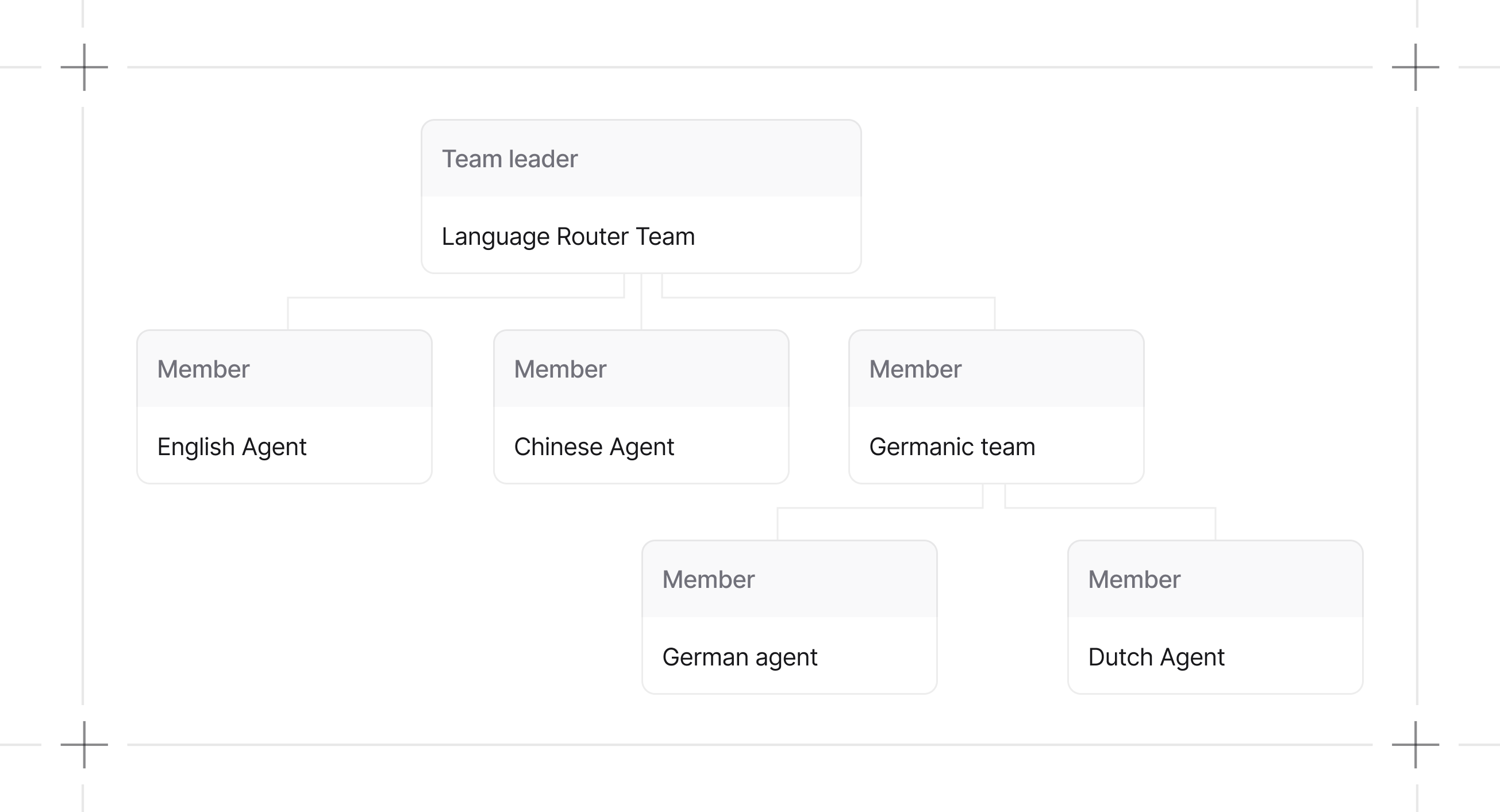
A Team coordinates agents or nested teams. In the default coordinate mode, the leader can delegate tasks based on member roles and synthesize their results.
 ```python theme={null}
from agno.team import Team
from agno.agent import Agent
team = Team(members=[
Agent(name="English Agent", role="You answer questions in English"),
Agent(name="Chinese Agent", role="You answer questions in Chinese"),
Team(
name="Germanic Team",
role="You coordinate the team members to answer questions in German and Dutch",
members=[
Agent(name="German Agent", role="You answer questions in German"),
Agent(name="Dutch Agent", role="You answer questions in Dutch"),
],
),
])
```
## Why Teams?
Use a team when separate roles, tools, or execution paths make a task easier to control.
| Benefit | Description |
| -------------- | ------------------------------------------------------------------- |
| Specialization | Give each member a focused role and toolset |
| Coordination | Select coordinate, route, broadcast, or tasks mode |
| Composition | Nest teams when a sub-team needs its own leader and members |
| Inspection | Keep member responses and metrics separate from the leader response |
The leader and members make separate model calls. This adds latency, token usage, and coordination state.
## When to Use Teams
**Use a team when:**
* A task requires multiple specialized agents with different tools or expertise
* You need an explicit routing, broadcast, or task-list pattern
* Member runs need separate outputs or metrics
**Use a single agent when:**
* The task fits one domain of expertise
* Minimizing token costs matters
* The extra coordination does not improve the result
## Team Capabilities
### Callable Factories
`knowledge`, `tools`, and `members` all accept callable factories. Agents also support callable factories for `knowledge` and `tools`. See [callable factories](/teams/building-teams#callable-factories) for examples and [caching settings](/teams/building-teams#callable-caching-settings) for cache key configuration.
## Team Modes
`TeamMode` makes collaboration styles explicit. Prefer `mode=` instead of toggling `respond_directly` or `delegate_to_all_members` directly.
```python theme={null}
from agno.team import Team, TeamMode
team = Team(
name="Research Team",
members=[...],
mode=TeamMode.broadcast,
)
```
Mode selection controls how the leader delegates. The leader can still answer directly or use its own tools. `mode` overrides legacy flags. If `mode` is not set, `respond_directly=True` maps to `TeamMode.route` and `delegate_to_all_members=True` maps to `TeamMode.broadcast`. Otherwise the team uses `TeamMode.coordinate`.
Modes define the delegation path without changing member configuration. See [Delegation](/teams/delegation).
## Guides
Define members, roles, and structure.
Execute teams and handle responses.
Inspect and troubleshoot team behavior.
## Resources
* [Examples](/examples/teams/overview)
* [Reference](/reference/teams/team)
```python theme={null}
from agno.team import Team
from agno.agent import Agent
team = Team(members=[
Agent(name="English Agent", role="You answer questions in English"),
Agent(name="Chinese Agent", role="You answer questions in Chinese"),
Team(
name="Germanic Team",
role="You coordinate the team members to answer questions in German and Dutch",
members=[
Agent(name="German Agent", role="You answer questions in German"),
Agent(name="Dutch Agent", role="You answer questions in Dutch"),
],
),
])
```
## Why Teams?
Use a team when separate roles, tools, or execution paths make a task easier to control.
| Benefit | Description |
| -------------- | ------------------------------------------------------------------- |
| Specialization | Give each member a focused role and toolset |
| Coordination | Select coordinate, route, broadcast, or tasks mode |
| Composition | Nest teams when a sub-team needs its own leader and members |
| Inspection | Keep member responses and metrics separate from the leader response |
The leader and members make separate model calls. This adds latency, token usage, and coordination state.
## When to Use Teams
**Use a team when:**
* A task requires multiple specialized agents with different tools or expertise
* You need an explicit routing, broadcast, or task-list pattern
* Member runs need separate outputs or metrics
**Use a single agent when:**
* The task fits one domain of expertise
* Minimizing token costs matters
* The extra coordination does not improve the result
## Team Capabilities
### Callable Factories
`knowledge`, `tools`, and `members` all accept callable factories. Agents also support callable factories for `knowledge` and `tools`. See [callable factories](/teams/building-teams#callable-factories) for examples and [caching settings](/teams/building-teams#callable-caching-settings) for cache key configuration.
## Team Modes
`TeamMode` makes collaboration styles explicit. Prefer `mode=` instead of toggling `respond_directly` or `delegate_to_all_members` directly.
```python theme={null}
from agno.team import Team, TeamMode
team = Team(
name="Research Team",
members=[...],
mode=TeamMode.broadcast,
)
```
Mode selection controls how the leader delegates. The leader can still answer directly or use its own tools. `mode` overrides legacy flags. If `mode` is not set, `respond_directly=True` maps to `TeamMode.route` and `delegate_to_all_members=True` maps to `TeamMode.broadcast`. Otherwise the team uses `TeamMode.coordinate`.
Modes define the delegation path without changing member configuration. See [Delegation](/teams/delegation).
## Guides
Define members, roles, and structure.
Execute teams and handle responses.
Inspect and troubleshoot team behavior.
## Resources
* [Examples](/examples/teams/overview)
* [Reference](/reference/teams/team)