

Integrating Agno with Confident AI
Confident AI is an LLM observability and evaluation platform.confident-trace, its OpenTelemetry-native tracing SDK, detects Agno automatically, so agent runs show up in the Observatory with their model and tool calls nested beneath them. No instrumentor or tracer provider configuration is required.
Prerequisites
-
Install Dependencies
Ensure you have the necessary packages installed:
-
Setup Confident AI Account
- Sign up for an account at Confident AI.
- Obtain your project API key from your project settings.
-
Set Environment Variables
Configure your environment with the Confident AI API key, alongside the provider key your agent uses:
For users in the EU region, set the
CONFIDENT_OTEL_ENDPOINTvariable tohttps://eu.otel.confident-ai.com/v1/traces.
Sending Traces to Confident AI
Callinit() once at startup, before running your agent. You don’t have to change your usual agent.run() calls. Confident AI automatically instruments everything for you.
confident-trace automatically attaches an Agno integration label to your spans and captures:
- Agent and team execution: Run names, timing, status, inputs, outputs, and parent-child relationships.
- Workflows and steps: Workflow execution, individual steps, and supported parallel, conditional, loop, and router containers.
- Tool calls: Tool names and their input/output.
- Model calls: Messages, model details, and token usage from supported provider integrations.
- Custom spans: Application spans created inside a tool remain nested under that execution.
Advanced Features
Online Evals
You can configure what happens to your incoming traces on Confident AI’s workflows page.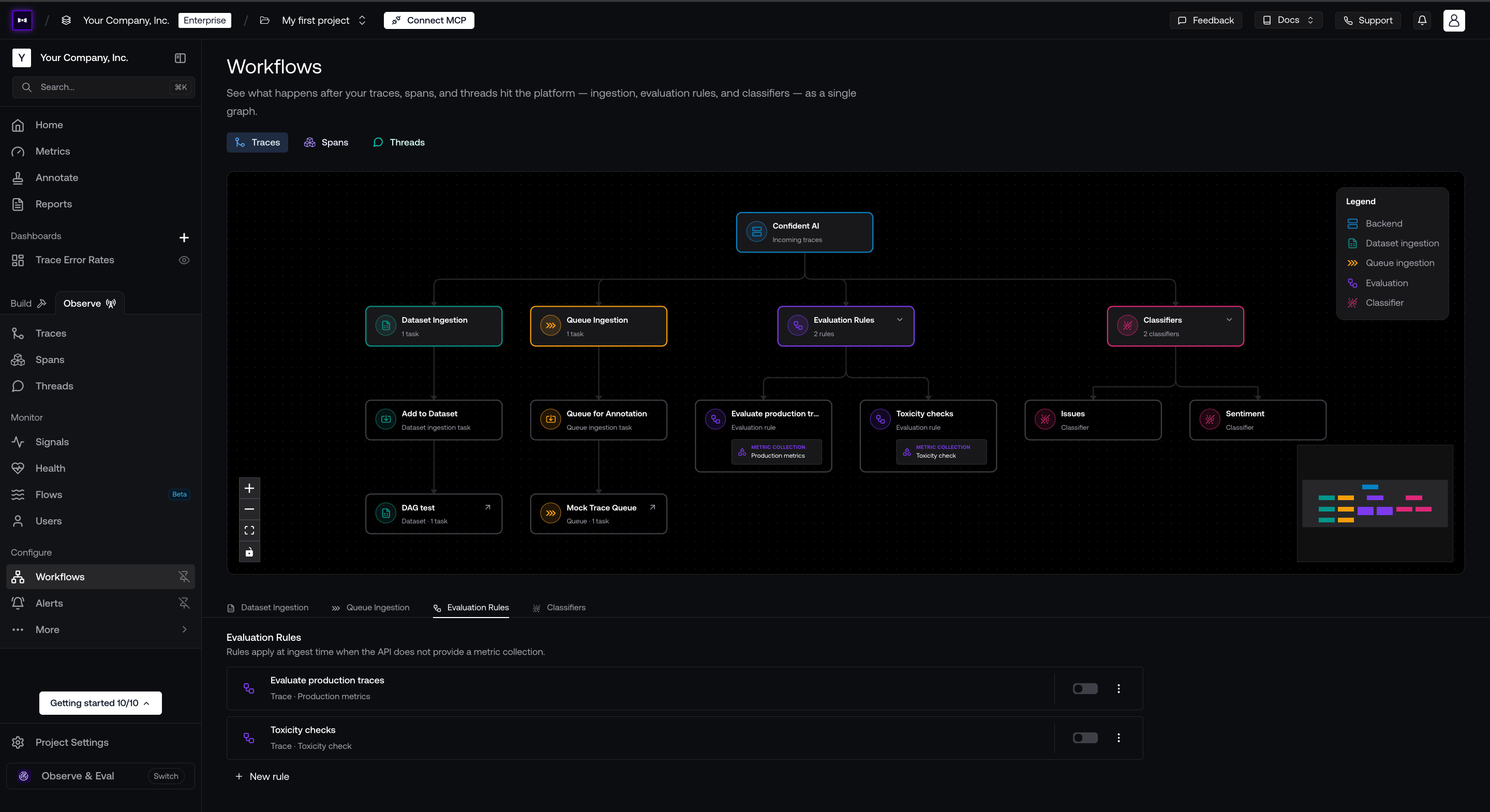
Confident AI workflows page
- Evaluation rules: Evaluate incoming traces against a metric collection.
- Classifiers: Label your traces by issue, sentiment, or any dimension you define, which lets you group or filter them later on.
- Queue ingestion: Add your production traces to annotation queues so your internal review team can annotate them by hand.
- Dataset ingestion: Ingest your production traces into datasets so you can reuse them as test cases and iterate on results to improve over time.
update_trace. See online evaluations.
Trace Properties
Use a trace context to attach tags, metadata, and a user ID that you know before the run starts. It creates no extra span. The trace started byagent.run() inherits everything you pass:
Group Traces Into Threads
confident-trace provides a turn() method you can use to group two sequential Agno entry-point calls into one turn. Reuse the same thread ID on later turns to group them into one thread you can view and evaluate on Confident AI:
Notes
- Initialize once, shut down once: In a long-running server, call
init()at startup andshutdown()during graceful shutdown, after active agent runs finish. Do not call them per request. - Missing traces: If you don’t see a trace, it is almost always because the program exited before the traces were posted. Make sure you’re calling
shutdown(), orflush()in long-running processes, before exit. - Model spans: Agno spans describe the structure of a run. Model calls are captured by the supported provider integrations that
init()enables alongside Agno, so keep the relevant provider integration on. Model backends that bypass those SDKs show the agent structure but no LLM spans. - Background jobs: Background job dispatch is not traced as completed agent execution; instrument the worker that runs the job.
- Need help integrating?: Talk to a human.